

 UK
UKThinkMarkets Help Centre
Depositing funds and methods
How can I deposit funds into my ThinkMarkets trading account?
To deposit funds into your ThinkMarkets trading account, log in to ThinkPortal. Once logged in, navigate to Funding in the left-hand menu and select Deposit. Choose the trading account you wish to fund, and you will then be shown the available funding methods for your region. ThinkMarkets offers a range of deposit options, including several fee-free methods. In many regions, instant funding options such as Skrill, Neteller, and bank cards are available.
You can also deposit funds directly through ThinkTrader Web or the ThinkTrader mobile app.
If you need assistance, contact the ThinkMarkets client support team, available 24/7.
How can I deposit funds into my ThinkMarkets trading account using Neteller?
To deposit funds using Neteller, go to ThinkMarkets and select Log in from the top right corner. Enter your credentials and access your ThinkPortal account.
Once logged in, open the menu, navigate to Funding, and select Deposit. Choose the trading account you would like to fund.
Select Credit Cards, E-Wallet, and Other methods as your funding category. Enter the amount you wish to deposit and choose Neteller from the available payment options.
You will then be prompted to enter your Neteller account details to complete the transaction.
How can I deposit funds into my ThinkMarkets trading account using a credit or debit card?
To deposit funds using a credit or debit card, go to ThinkMarkets and select Log in from top right hand corner, enter your credentials, and access your ThinkPortal account.
Once logged in, open the menu and navigate to Funding, then select Deposit. Choose the trading account you would like to fund.
Select Credit Cards, E-Wallet as the payment method and enter the amount you wish to deposit. You will then be prompted to provide your card details to complete the transaction.
How can I deposit funds into my ThinkMarkets trading account using Apple Pay?
To deposit funds using Apple Pay, go to ThinkMarkets and select Log in from the top right corner, enter your credentials, and access your ThinkPortal account.
Once logged in, open the menu, navigate to Funding, and select Deposit. Choose the trading account you would like to fund.
Select Apple Pay from the available funding options and confirm the payment to complete the transfer.
How can I deposit funds into my ThinkMarkets trading account using Google Pay?
To deposit funds using Google Pay, go to ThinkMarkets and select Log in from the top right corner, enter your credentials, and access your ThinkPortal account.
Once logged in, open the menu, navigate to Funding, and select Deposit. Choose the trading account you would like to fund.
Select Google Pay from the available funding options, enter the amount you wish to deposit, and confirm the payment to complete the transfer.
How can I deposit funds into my ThinkMarkets trading account using Skrill?
To deposit funds using Skrill, go to ThinkMarkets, select Log in from the top right corner, enter your credentials, and access your ThinkPortal account.
Once logged in, open the menu, navigate to Funding, and select Deposit. Choose the trading account you would like to fund.
Select Credit Cards, E-Wallet, and Other methods as the funding category, then enter the amount you wish to deposit. Choose Skrill from the available payment options and enter your Skrill account details to complete the transfer.
How can I deposit funds into my ThinkMarkets trading account using a bank transfer?
To deposit funds using a bank transfer, go to ThinkMarkets and select Log in from the top right corner, enter your credentials, and access your ThinkPortal account.
Once logged in, open the menu, navigate to Funding, and select Deposit. Choose the trading account you would like to fund.
Select Bank Transfer from the available funding options. You will then be shown the bank account details required to complete the transfer.
To avoid unnecessary currency conversion fees, it is recommended to choose a bank account that matches the currency of your trading account. Complete the transfer through your banking app or online banking service using the details provided.
What is the minimum deposit for a ThinkMarkets trading account?
There is no minimum deposit requirement for ThinkTrader, Standard MetaTrader 4, or Standard MetaTrader 5 accounts. However, ThinkZero accounts require a minimum deposit of GBP 500.
Clients can fund their accounts using a range of payment methods, including Visa, Mastercard, Apple Pay, Google Pay, Skrill, Neteller, and bank transfer (SWIFT or SEPA).
Fees, availability, and processing times may vary depending on the selected payment method. For the latest information, please refer to the funding section in ThinkPortal.
Can I get reimbursed for bank fees when depositing funds into my ThinkMarkets trading account?
ThinkMarkets does not charge any fees for deposits. However, your bank or any intermediary banks involved in the transaction may apply their own charges, which are outside of ThinkMarkets' control.
How can I deposit funds into my ThinkMarkets trading account using the ThinkTrader mobile app?
To deposit funds using the ThinkTrader mobile app, first download the ThinkTrader app from the AppleStore or Google Play Store if you have not already installed it. Then log in using your live ThinkMarkets trading account credentials.
Once logged in, select Deposit Funds within the app. If you do not see the Deposit Funds option, make sure you are logged in to your live account and that the arrow next to the account balance at the top of the screen is facing upward.
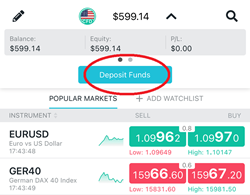
After selecting Deposit Funds, you will see the funding methods available for your region. Choose your preferred payment method and follow the on-screen instructions to complete the deposit.

If you prefer to deposit funds through a web browser, you can also fund your account using ThinkTrader Web.
How can I deposit funds into my ThinkMarkets trading account using ThinkTrader Web?
To deposit funds through ThinkTrader Web, log in to your live trading account here.
Once logged in, navigate to the left-hand menu and select Funds. Then choose the trading account you would like to fund.
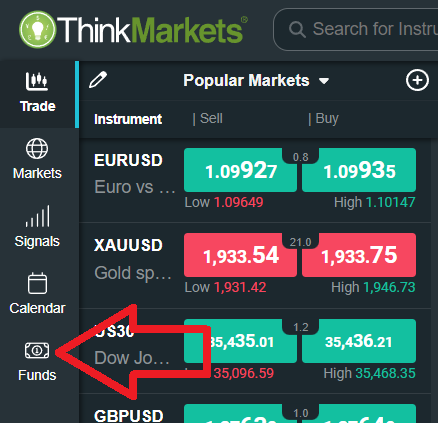
You will then be shown the funding methods available for your region. Select your preferred payment method and follow the instructions to complete the deposit.
How can I deposit funds into my ThinkMarkets trading account using ThinkPortal?
To deposit funds through ThinkPortal, log in and navigate to the left-hand menu and select Funding, then choose Deposit. Select the trading account you would like to fund.
You will then be shown the deposit methods available for your region. Choose your preferred funding option and follow the on-screen instructions to complete the deposit.
Withdrawing funds and processing
How can I withdraw funds from my ThinkMarkets trading account?
To withdraw funds from your ThinkMarkets trading account, log in to ThinkPortal and select the Withdrawal tab from the menu on the left side. Choose the trading account you want to withdraw from and select your preferred withdrawal method.
Please note that ThinkMarkets follows a back-to-the-source policy. This means that withdrawals must generally be processed back to the same payment method that was originally used to make the deposit.
For more detailed information about the withdrawal process, you can visit the Withdrawal of Funds page.
What is the minimum withdrawal from a ThinkMarkets account?
ThinkMarkets does not set a fixed minimum withdrawal amount for UK clients.
Withdrawals are generally processed back to the original funding source in accordance with ThinkMarkets' Back-to-Source Policy. Processing times and any applicable fees depend on the withdrawal method used.
How can I cancel a withdrawal request in ThinkPortal on my ThinkMarkets trading account?
To cancel a withdrawal request, log in to your ThinkPortal account and follow these steps:
Navigate to Funding >> Transaction History >> select the withdrawal request >> click Cancel.
A withdrawal request can only be cancelled if it is still in Pending status and has not yet been processed. Once the withdrawal has been processed, it cannot be cancelled or reversed.
Can I withdraw funds from my ThinkMarkets trading account if I still have open trading positions?
Yes, you can withdraw funds even if you have open trading positions, as long as your account has enough free equity available. You must ensure that sufficient funds remain in your account to maintain your existing positions after the withdrawal is processed.
How can I withdraw trading profits from my ThinkMarkets trading account using ThinkPortal?
To withdraw funds from your ThinkMarkets trading account, log in to ThinkPortal, select Funding from the left-hand menu, then choose Withdrawal. Select the trading account you wish to withdraw from and the destination method.
Withdrawals are generally processed back to the original funding source in accordance with ThinkMarkets' Back-to-Source Policy. Processing times and any applicable fees vary depending on the withdrawal method used.
For more information about available funding and withdrawal methods, please visit ThinkMarkets Deposit & Withdrawals page.
Withdrawal issues and restrictions
Why might my ThinkMarkets withdrawal request be declined?
A withdrawal request may be declined for several common reasons.
One reason may be that the withdrawal is being requested to a third-party account or to a payment method that was not previously used to deposit funds. ThinkMarkets follows a back-to-the-source policy, which means withdrawals generally need to be sent back to the original deposit method.
Another reason may be that there are insufficient available funds in your trading account to process the withdrawal request.
If your withdrawal request is declined, the ThinkMarkets team will notify you of the reason and provide guidance on how to proceed. You can also contact the client support team 24/7 if you require further assistance.
Can I withdraw funds from my ThinkMarkets trading account using a different payment method than the one used for my deposit?
In most cases, withdrawals must be processed using the same payment method that was used for the original deposit. ThinkMarkets follows a back-to-the-source policy to comply with regulatory and anti-money laundering requirements.
If multiple deposit methods were used, withdrawals may be returned to those funding sources in the same order or proportion as the deposits. Once the deposited amount has been returned to the original payment methods, any remaining profits may be withdrawn using an alternative available withdrawal method, depending on your region and account eligibility.
If you are unsure which withdrawal methods are available for your account, you can check within ThinkPortal or contact the ThinkMarkets client support team for assistance.
What if my original deposit method is unavailable for withdrawal?
If the payment method you used for your deposit is not available when submitting a withdrawal request, you can send a manual withdrawal request from your ThinkMarkets registered email address to ThinkMarkets support team. In your email, include the withdrawal amount, currency, trading account details, and the preferred withdrawal method so the client support team can process your request.
How do I withdraw funds if my linked bank account is closed?
If your bank account is closed and can no longer accept funds, you will need to provide valid proof that the account has been closed along with an updated bank statement for your new bank account. Once the ThinkMarkets team verifies the documents, you will be able to withdraw funds via bank wire to your new bank account.
You can send the proof of closure and the updated bank statement from your registered email address to ThinkMarkets support team.
Why doesn't the card number for my Apple/Google Pay withdrawal match my physical card?
When you add a debit or credit card to Apple Pay or Google Pay, the system does not store or transmit your actual card number. Instead, it generates a Device Account Number (DAN), also known as a Virtual Account Number in Google Pay.
This number is unique to your device and is used for security purposes, which is why the card number displayed in the withdrawal section may not match the number printed on your physical card.
To locate the Device Account Number used by your digital wallet, follow the steps below.
• Apple Pay (iPhone and Apple Watch)
1. Open the Wallet app.
2. Select the card.
3. Tap the three dots in the top right corner.
4. Scroll down to view the Device Account Number.
• Google Pay (Android)
1. Open the Google Wallet app.
2. Select the card.
3. Tap Details or Virtual Account Number depending on your app version.
4. The last four digits of the virtual card number will be displayed.
Can I withdraw to a replacement card if my original was lost or stolen?
No, deposits made using a lost or stolen card cannot be refunded to a replacement card, even if the new card is linked to the same bank account. In this situation, you will need to provide valid proof that the original card was lost or stolen. Once the documentation is verified, ThinkMarkets will process your withdrawal via bank wire instead.
How do I withdraw if my original deposit card is now inactive?
If the card you used to deposit funds is no longer active, you will need to provide valid proof that the card is no longer active. Once the ThinkMarkets team verifies the documentation, you will be able to withdraw your funds via bank wire.
What is the 'Return to Source' policy and why is it required?
To comply with ThinkMarkets Anti-Money Laundering guidelines, deposits and withdrawals made by any third party are strictly prohibited.
ThinkMarkets follows a back-to-the-source policy, which means withdrawals must be returned to the same payment method that was used to make the original deposit. For example, if you deposited funds using Skrill, the withdrawal must also be processed through Skrill. This policy applies to all payment methods offered by ThinkMarkets.
If it is not possible to return the funds to the original payment method, the withdrawal may be processed via bank wire to a bank account that is in the same name as the ThinkMarkets trading account holder.
For more information about withdrawals, please visit the Withdrawal of Funds page.
Transfers between accounts
Can I transfer funds from another broker to my ThinkMarkets trading account?
Yes, ThinkMarkets supports broker-to-broker transfers.
To initiate a transfer, please contact the support team by email and request a Broker to Broker transfer form. Once you receive the form, complete it and send it to the broker you wish to transfer the funds from so they can process the transfer to your ThinkMarkets trading account.
Can I do a broker-to-broker fund transfer to ThinkMarkets?
Yes, ThinkMarkets clients can request a broker-to-broker transfer, which allows you to move funds directly from another regulated broker to your ThinkMarkets trading account. This method can be an efficient way to transfer your funds without withdrawing them to a personal bank account first.
To request a broker-to-broker transfer form, please contact the ThinkMarkets client support team, available 24/7.
How do I transfer funds between my ThinkMarkets accounts?
To transfer funds between two of your ThinkMarkets trading accounts, log in to ThinkPortal, click the Funding tab on the left side, and select Transfer.
Next, choose the From account and the To account, then enter the amount you want to transfer in your preferred currency. Once you submit the request, the inter-account transfer will be processed instantly.
How can I top up the balance of my ThinkMarkets demo trading account?
To top up your ThinkMarkets demo account balance, you can submit a request through ThinkPortal or send an email from your registered email address to ThinkMarkets support. Please include your demo account number and the balance adjustment request.
Once the request is processed, the ThinkMarkets team will send you a confirmation email.
Alternatively, you can contact a live agent through live chat for assistance.
Currency and fees
What is the ThinkMarkets currency conversion fee when depositing or withdrawing in a different account currency?
ThinkMarkets applies a currency conversion fee of 3% when funds are converted from one currency to another during deposits, withdrawals, or transfers involving different account currencies.
For more information about available account types and their features, please visit the ThinkMarkets Account Types page.