

 UK
UKThinkMarkets Help Centre
Opening and application status
How can a new or existing client open a trading account with ThinkMarkets?
If you do not currently have an account with ThinkMarkets, you can open one by visiting ThinkMarkets client portal and selecting Create account. Follow the steps provided to choose your preferred trading platform, account currency, and leverage, then complete the registration process to create your account.
If you already have a ThinkMarkets account, you can open an additional trading account through ThinkPortal. After logging in to ThinkPortal, go to the right-hand side of the dashboard and select Create Live Account under Quick Actions.
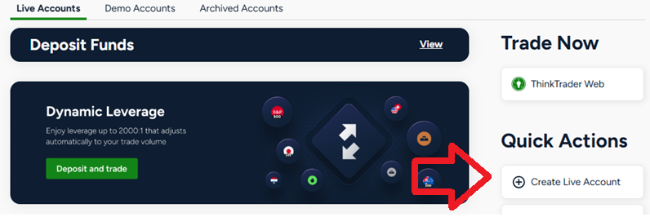
You will then be prompted to select your preferred trading platform, account currency, and leverage before completing the account setup process.
Why do I need to choose an account currency when opening a trading account with ThinkMarkets?
When you open a trading account with ThinkMarkets, you are required to select an account currency. This is the base currency in which your account balance, deposits, withdrawals, profits, and losses will be maintained.
It is recommended that you choose the currency that best matches how you plan to fund your account and manage your trading activity. If you deposit or withdraw funds in a different currency, conversion fees may apply.
Available account currencies may vary depending on the account type. Common account currency options for UK clients include GBP, USD, EUR, AUD, and CHF.
Once an account currency has been selected during account creation, it cannot be changed. If you would like to use a different account currency, you will need to open an additional trading account through ThinkPortal.
What account types are available when opening a trading account with ThinkMarkets?
ThinkMarkets offers several account types for clients who want to trade Contracts for Difference (CFDs) or Cash Equities.
The available account types include Individual accounts, Joint accounts, and Corporate accounts. These account structures allow clients to choose the setup that best matches their personal or business trading needs.
Cash Equities accounts are currently only available to residents of Australia.
You can apply for a ThinkMarkets trading account online. You can also view information on the range of trading accounts available.
Which countries are eligible to open a ThinkMarkets trading account?
ThinkMarkets accepts clients from most countries worldwide. During the account registration process, you will be asked to select your country of residence from a dropdown list in the application form.
If your country appears in the country of residence dropdown on the registration page, you are eligible to apply for a ThinkMarkets trading account. If your country does not appear in the list, it means that account applications from that jurisdiction are currently not supported.
You can check the available countries and begin the application process on the ThinkMarkets account page.
What is the minimum age required to open a trading account with ThinkMarkets?
The minimum age required to open a trading account with ThinkMarkets is 18 years old.
Applicants who are under the age of 18 are not eligible to open an account, and any account applications submitted by individuals below this age will be declined.
How long does ThinkMarkets take to review a trading account application?
Trading account applications submitted to ThinkMarkets are typically reviewed by the accounts team within up to 24 hours.
You should regularly check your email for updates regarding your application, including your inbox and junk or spam folder, as the team may contact you if additional information or clarification is required.
How can I check the status of my ThinkMarkets trading account application?
You can check the status of your trading account application by logging in to ThinkPortal.
If you see a live account number displayed on your dashboard, this means your account application has been approved and your trading account is active.
If your application has been declined, ThinkMarkets will send a notification to your registered email address explaining the reason for the rejection and any relevant details regarding the decision.
Verification and compliance
What is a National Insurance Number (NINO) and why does ThinkMarkets require UK clients to provide it when trading CFDs?
A National Insurance Number (NINO) is a unique number used in the United Kingdom for the National Insurance and social security system. It is used by the government to track tax contributions, social security benefits, and employment records.
ThinkMarkets requires UK clients to provide their National Insurance Number due to financial regulations introduced under the Markets in Financial Instruments Directive II (MiFID II) in 2018. These regulations enhanced transaction reporting requirements, meaning that UK residents who trade Contracts for Difference (CFDs) must have their transactions reported. As a result, the National Insurance Number is required to meet regulatory reporting obligations.
You can find your National Insurance Number on documents such as payslips, P60 forms, or official letters related to your tax, pension, or government benefits. If you cannot locate your National Insurance Number, you can request it through the UK government.
To add your National Insurance Number to your ThinkMarkets account, contact the team and request that your account records be updated with your NINO.
What happens if I fail the ThinkMarkets appropriateness test for trading CFDs?
As a regulated broker, ThinkMarkets is required to assess whether clients have sufficient knowledge and understanding of Contracts for Difference (CFDs) and the risks involved before allowing them to trade.
If the appropriateness assessment indicates that you may not currently have the required experience or knowledge, you may not be able to proceed with opening a live trading account at that time. Instead, you can create a demo account to practice trading in a simulated environment. You are also encouraged to review the educational materials available to help improve your understanding of CFD trading and its associated risks.
If your experience or circumstances change in the future, you can contact the ThinkMarkets support team to request a reassessment.
If any information submitted during the registration process was incorrect, please notify the ThinkMarkets team so they can review your application and clarify any potential errors.
Why am I unable to upload verification documents in ThinkPortal?
If you are unable to upload documents in ThinkPortal, such as Know Your Customer (KYC) verification documents, it may be due to a browser-related issue. Try clearing your browser cache and cookies, then log in to ThinkPortal again and attempt to upload your documents.
If the issue continues after clearing your browser cache and cookies, please contact the ThinkMarkets support team for assistance. You can reach ThinkMarkets support team through live chat, by phone or email.
What is a Tax Identification Number (TIN) and why does ThinkMarkets require clients to provide it?
A Tax Identification Number (TIN) is a unique combination of numbers and/or letters issued by a government tax authority to identify individuals and organisations for tax purposes.
Tax Identification Numbers vary by country, as each jurisdiction uses its own format and naming conventions. For detailed information about Tax Identification Numbers in different countries, you can refer to the official guidance on Tax Identification Numbers.
ThinkMarkets requests your Tax Identification Number as part of its due diligence and regulatory compliance procedures. Collecting this information helps meet reporting obligations under the Common Reporting Standard (CRS), which requires financial institutions to identify and report certain tax-related information about account holders.
What documents are required to open and verify a live trading account with ThinkMarkets in the United Kingdom?
To open and activate a live trading account with ThinkMarkets in the United Kingdom, you must complete an identity verification process as part of regulatory compliance requirements.
You will be required to provide a valid proof of identity document and a valid proof of residential address document, together with your first identifier (for example, a National Insurance number for UK nationals). Clients holding other nationalities should contact our support team for guidance on the appropriate identifier to provide.
Proof of identity can include a valid passport, national identity card, driving licence or another government-issued identification document.
Proof of address can include a utility bill, local authority tax bill or bank statement. The document must be issued in your name and must not be older than six months. Documents showing a PO Box address are not accepted as proof of residence.
All submitted documents must be clear, fully visible and easy to read. Documents that are cropped, blurred, low resolution or obstructed by flash will not be accepted. The documents must also be in good condition and show no signs of damage or alteration.
How can I upload verification documents to my ThinkMarkets account?
You can upload your documents by logging in to ThinkMarkets ThinkPortal and navigating to the “Upload Documents” section to submit the requested files.
Alternatively, you can send your documents using your registered email address by emailing the Account Department for verification.
Account changes and management
How do I switch from MetaTrader 4 to ThinkTrader with ThinkMarkets?
It is not possible to convert an existing MetaTrader 4 or MetaTrader 5 account into a ThinkTrader account.If you would like to use ThinkTrader, you will need to open a new ThinkTrader account through ThinkPortal. Simply log in to ThinkPortal, select Create Live Account from the Quick Actions section, choose ThinkTrader as your preferred platform, and complete the setup.
ThinkTrader is the proprietary trading platform from ThinkMarkets, available on desktop, web, and mobile. United Kingdom clients can also open spread betting accounts on the ThinkTrader platform.
If you do not yet have a ThinkMarkets account, you can complete the online application and select ThinkTrader as your preferred platform during registration.
Can I open and manage multiple trading accounts with ThinkMarkets?
Yes, you can have multiple trading accounts with ThinkMarkets.
Clients can open different account types, such as Standard or ThinkZero trading accounts, and can also hold accounts across different trading platforms including MetaTrader 4, MetaTrader 5, and ThinkTrader.
Once your account profile has been approved, you can create additional trading accounts through ThinkPortal. Simply log in to ThinkPortal and select Create Live Account from the Quick Actions section to instantly set up another account.

How can I change the base currency of my ThinkMarkets trading account?
It is not possible to change the base currency of a ThinkMarkets trading account after the account has been created.
If you would like to use a different account currency, you can create an additional trading account with your preferred currency. This can be done quickly through ThinkPortal by logging in and selecting Create Live Account from the Quick Actions section.
Can I change the type of my ThinkMarkets trading account after it has been created?
It is not possible to change the type of an existing ThinkMarkets trading account.
If you would like to use a different account type, you can open an additional trading account through ThinkPortal. Simply log in to ThinkPortal and select Create Live Account from the Quick Actions section, then choose your preferred account type.
How can I create a different account type if I already have a ThinkMarkets trading account?
If you already have an approved ThinkMarkets account, you can create an additional account with a different account type through ThinkPortal.
Log in to ThinkPortal and locate the Quick Actions section on the right-hand side of the dashboard. Select Create Live Account and choose the account type you would like to open.
Your new account will be automatically approved once you meet the minimum initial deposit requirement for that account type.
How do I convert my ThinkMarkets Standard account to a ThinkZero account?
It is not possible to convert an existing ThinkMarkets Standard account to a ThinkZero account.
If you would like to use a ThinkZero account, you can open a new account through ThinkPortal. Simply log in to ThinkPortal, select Create Live Account from the Quick Actions section, and choose the ThinkZero account type.
Please note that a minimum deposit of GBP 500 is required for ThinkZero accounts.
Once your account has been created and funded, you will be able to begin trading.
How can I convert my ThinkZero trading account to a Standard account?
To convert your ThinkMarkets ThinkZero trading account to a Standard account, you need to submit a request to the support team.
You can create a support request through ThinkPortal or send an email from your registered email address to ThinkMarkets support. In your request, include your trading account number and clearly state that you would like to convert your ThinkZero account to a Standard account.
Before submitting your request, please ensure there are no open positions on the account you want to convert. Once the request has been processed, the ThinkMarkets client support team will notify you by email when the account conversion has been completed.
How can I change the leverage on my ThinkMarkets trading account?
To request a change in leverage for your ThinkMarkets trading account, you can submit a leverage change request through ThinkPortal or send an email from your registered email address to ThinkMarkets support team.
In your request, please include your trading account number, the leverage level you would like to apply for, and the reason for requesting the change.
Before submitting your request, ensure that all open positions on the account are closed. The ThinkMarkets client support team will review your request and contact you as soon as possible with the outcome.
How can I increase the number of trading accounts I am allowed to open with ThinkMarkets?
If you would like to increase your account limit so you can open more active trading accounts, you can submit a request through ThinkPortal or send an email from your registered email address to ThinkMarkets support.
In your request, please include the reason why you need multiple trading accounts. The ThinkMarkets client support team will review your request and may contact you for additional information if required.
Please note that clients who do not have a live trading account are limited to one demo account per trading platform.
How can I update my personal details on my ThinkMarkets trading account?
If you need to update your personal details, such as your address, phone number, or other account information, please send a request from your registered email address to ThinkMarkets support team.
If you are updating your residential address, you must include a valid proof of address document with your request so the team can verify and update your records.
The ThinkMarkets client support team will review your request and contact you as soon as possible once the update has been processed.
Account closure and reactivation
How can I reactivate an old ThinkMarkets trading account?
To request the reactivation of an old ThinkMarkets trading account, please email ThinkMarkets support from your registered email address.
In your email, include the trading account number you would like to reactivate along with your full name, date of birth, and residential address so the team can verify your identity and locate your account.
Please note that in some circumstances it may not be possible to restore an old account. If this applies to your request, the support team will inform you and provide further guidance.
How can I close my ThinkMarkets trading account?
To close your ThinkMarkets trading account, you can submit an account closure request through ThinkPortal or send an email from your registered email address to ThinkMarkets support.
In your request, please include your trading account number and the reason you wish to close your account. The ThinkMarkets support team will review your request and assist you with completing the account closure process.
Statements and reporting
How can I obtain a trading statement from ThinkMarkets for tax purposes?
To request a trading statement for tax purposes, please send an email from your registered email address to ThinkMarkets support.
In your request, include your trading account number and specify the reporting period you need for the statement. The ThinkMarkets support team will process your request and provide the relevant report.
How can I unsubscribe from receiving ThinkMarkets account statement emails?
To unsubscribe from receiving ThinkMarkets account statement emails, simply click the unsubscribe link included in the account statement email you receive. This will allow you to unsubscribe from future account statement emails sent to your address.