

ThinkMarkets Help Centre
Opening and application status
How can a new or existing client open a trading account with ThinkMarkets?
If you do not currently have an account with ThinkMarkets, you can open one by visiting ThinkMarkets client portal and selecting Create account. Follow the steps provided to choose your preferred trading platform, account currency, and leverage, then complete the registration process to create your account.
If you already have a ThinkMarkets account, you can open an additional trading account through ThinkPortal. After logging in to ThinkPortal, go to the right-hand side of the dashboard and select Create Live Account under Quick Actions.
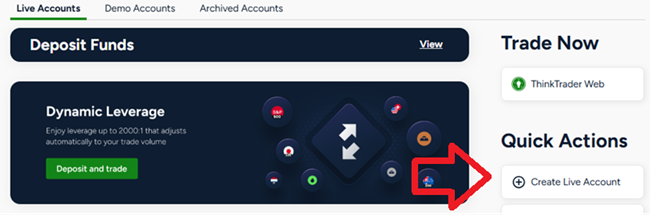
You will then be prompted to select your preferred trading platform, account currency, and leverage before completing the account setup process.
Why do I need to choose an account currency when opening a trading account with ThinkMarkets?
When you open a trading account with ThinkMarkets, you are required to select an account currency. This is the base currency in which your trading account will be maintained and used for deposits, withdrawals, and account balances.
It is recommended that you choose the currency that best matches how you plan to fund your account and manage your trading activity. If you deposit or withdraw funds in a currency different from your selected account currency, currency conversion fees may apply.
ThinkMarkets offers several account currency options depending on your jurisdiction and account type. Common options include USD, EUR, GBP, AUD, and ZAR.
Once an account currency is selected during the account creation process, it cannot be changed. If you wish to use a different account currency later, you will need to create an additional trading account through ThinkPortal.
What account types are available when opening a trading account with ThinkMarkets?
ThinkMarkets offers several account types for clients who want to trade Contracts for Difference (CFDs) or Cash Equities.
The available account types include Individual accounts, Joint accounts, and Corporate accounts. These account structures allow clients to choose the setup that best matches their personal or business trading needs.
Cash Equities accounts are currently only available to residents of Australia.
You can apply for a ThinkMarkets trading account online. You can also view information on the range of trading accounts available.
Which countries are eligible to open a ThinkMarkets trading account?
ThinkMarkets accepts clients from most countries worldwide. During the account registration process, you will be asked to select your country of residence from a dropdown list in the application form.
If your country appears in the country of residence dropdown on the registration page, you are eligible to apply for a ThinkMarkets trading account. If your country does not appear in the list, it means that account applications from that jurisdiction are currently not supported.
You can check the available countries and begin the application process on the ThinkMarkets account page.
What is the minimum age required to open a trading account with ThinkMarkets?
The minimum age required to open a trading account with ThinkMarkets is 18 years old.
Applicants who are under the age of 18 are not eligible to open an account, and any account applications submitted by individuals below this age will be declined.
How long does ThinkMarkets take to review a trading account application?
Trading account applications submitted to ThinkMarkets are typically reviewed by the accounts team within up to 24 hours.
You should regularly check your email for updates regarding your application, including your inbox and junk or spam folder, as the team may contact you if additional information or clarification is required.
How can I check the status of my ThinkMarkets trading account application?
You can check the status of your trading account application by logging in to ThinkPortal.
If you see a live account number displayed on your dashboard, this means your account application has been approved and your trading account is active.
If your application has been declined, ThinkMarkets will send a notification to your registered email address explaining the reason for the rejection and any relevant details regarding the decision.
Verification and compliance
What is a National Insurance Number (NINO) and why does ThinkMarkets require UK clients to provide it when trading CFDs?
A National Insurance Number (NINO) is a unique number used in the United Kingdom for the National Insurance and social security system. It is used by the government to track tax contributions, social security benefits, and employment records.
ThinkMarkets requires UK clients to provide their National Insurance Number due to financial regulations introduced under the Markets in Financial Instruments Directive II (MiFID II) in 2018. These regulations enhanced transaction reporting requirements, meaning that UK residents who trade Contracts for Difference (CFDs) must have their transactions reported. As a result, the National Insurance Number is required to meet regulatory reporting obligations.
You can find your National Insurance Number on documents such as payslips, P60 forms, or official letters related to your tax, pension, or government benefits. If you cannot locate your National Insurance Number, you can request it through the UK government.
To add your National Insurance Number to your ThinkMarkets account, contact the team and request that your account records be updated with your NINO.
What happens if I fail the ThinkMarkets appropriateness test for trading CFDs?
As a regulated broker, ThinkMarkets is required to assess whether clients have sufficient knowledge and understanding of Contracts for Difference (CFDs) and the risks involved before allowing them to trade.
If the appropriateness assessment indicates that you may not currently have the required experience or knowledge, you may not be able to proceed with opening a live trading account at that time. Instead, you can create a demo account to practice trading in a simulated environment. You are also encouraged to review the educational materials available to help improve your understanding of CFD trading and its associated risks.
If your experience or circumstances change in the future, you can contact the ThinkMarkets support team to request a reassessment.
If any information submitted during the registration process was incorrect, please notify the ThinkMarkets team so they can review your application and clarify any potential errors.
Why am I unable to upload verification documents in ThinkPortal?
If you are unable to upload documents in ThinkPortal, such as Know Your Customer (KYC) verification documents, it may be due to a browser-related issue. Try clearing your browser cache and cookies, then log in to ThinkPortal again and attempt to upload your documents.
If the issue continues after clearing your browser cache and cookies, please contact the ThinkMarkets support team for assistance. You can reach ThinkMarkets support team through live chat, by phone or email.
What is a Tax Identification Number (TIN) and why does ThinkMarkets require clients to provide it?
A Tax Identification Number (TIN) is a unique combination of numbers and/or letters issued by a government tax authority to identify individuals and organisations for tax purposes.
Tax Identification Numbers vary by country, as each jurisdiction uses its own format and naming conventions. For detailed information about Tax Identification Numbers in different countries, you can refer to the official guidance on Tax Identification Numbers.
ThinkMarkets requests your Tax Identification Number as part of its due diligence and regulatory compliance procedures. Collecting this information helps meet reporting obligations under the Common Reporting Standard (CRS), which requires financial institutions to identify and report certain tax-related information about account holders.
What documents are required to open and verify a live trading account with ThinkMarkets?
To open and activate a live trading account with ThinkMarkets, you must complete an identity verification process as part of regulatory compliance requirements.
You will need to provide a proof of identity document and a proof of address document.
• Proof of identity can include a valid passport, national identity card, driving licence, or another government-issued identification document.
• Proof of address can include a utility bill, local authority tax bill, or bank statement. The document must be issued in your name and must not be older than six months. For residents of South Africa, the proof of address document must not be older than three months. Documents showing a PO Box address are not accepted as proof of residence.
All submitted documents must be clear, fully visible, and easy to read. Documents that are cropped, blurred, low resolution, or obstructed by flash will not be accepted. The documents must also be in good condition and show no signs of damage or alteration.
How can I upload verification documents to my ThinkMarkets account?
You can upload your documents by logging in to ThinkMarkets ThinkPortal and navigating to the “Upload Documents” section to submit the requested files.
Alternatively, you can send your documents using your registered email address by emailing the Account Department for verification.
Account changes and management
How can I switch from MetaTrader 4 or MetaTrader 5 to a ThinkTrader account with ThinkMarkets?
If you do not yet have a ThinkMarkets account, you can create one by visiting the ThinkMarkets account registration page and completing the online application form. During registration, select ThinkTrader as your preferred platform.
If you already have a MetaTrader 4 or MetaTrader 5 account with ThinkMarkets, you can create a ThinkTrader account through ThinkPortal. Log in to ThinkPortal, go to ‘Quick Actions’, and select ‘Create Live Account’. Then choose ThinkTrader as your platform and complete the setup.

Switching to ThinkTrader gives you access to dynamic leverage up to 2000:1, the ThinkRewards loyalty programme, a wider range of trading instruments, and the features of the ThinkTrader platform.
Can I open and manage multiple trading accounts with ThinkMarkets?
Yes, you can have multiple trading accounts with ThinkMarkets.
Clients can open different account types, such as Standard or ThinkZero trading accounts, and can also hold accounts across different trading platforms including MetaTrader 4, MetaTrader 5, and ThinkTrader.
Once your account profile has been approved, you can create additional trading accounts through ThinkPortal. Simply log in to ThinkPortal and select Create Live Account from the Quick Actions section to instantly set up another account.

How can I link my ThinkMarkets trading account to an Introducing Broker?
To link your ThinkMarkets trading account to an Introducing Broker, you need to send a request from your registered email address to [email protected].
In your email, include the reason you would like your account to be linked to the Introducing Broker and provide the relevant Introducing Broker details, including the broker’s name and the IB code they provided to you.
Please note that in some cases it may not be possible to link an existing account to an Introducing Broker, depending on account conditions and eligibility.
How can I change the base currency of my ThinkMarkets trading account?
It is not possible to change the base currency of a ThinkMarkets trading account after the account has been created.
If you would like to use a different account currency, you can create an additional trading account with your preferred currency. This can be done quickly through ThinkPortal by logging in and selecting Create Live Account from the Quick Actions section.
Can I change the type of my ThinkMarkets trading account after it has been created?
In some circumstances, it may be possible to change the type of your ThinkMarkets trading account.
To request a change, email ThinkMarkets support from your registered email address and include the trading account number for the account you would like to update. In your request, specify the new account type you would like to switch to.
Alternatively, you can create an additional trading account with your preferred account type. This can be done in just a few minutes through ThinkPortal.
How can I create a different account type if I already have a ThinkMarkets trading account?
If you already have an approved ThinkMarkets account, you can create an additional account with a different account type through ThinkPortal.
Log in to ThinkPortal and locate the Quick Actions section on the right-hand side of the dashboard. Select Create Live Account and choose the account type you would like to open.
Your new account will be automatically approved once you meet the minimum initial deposit requirement for that account type.
How do I convert my ThinkMarkets Standard account to a ThinkZero account?
To convert your ThinkMarkets Standard trading account to a ThinkZero account, you need to complete a few steps. First, ensure you deposit at least $500 into the trading account you want to convert.
Then, submit a request through ThinkPortal or send an email from your registered email address to ThinkMarkets support, clearly stating your trading account number and your request to convert to a ThinkZero account.
Before submitting your request, make sure there are no open positions on the selected account. Once your request has been processed, the ThinkMarkets client support team will confirm the successful conversion via email.
How can I convert my ThinkZero trading account to a Standard account?
To convert your ThinkMarkets ThinkZero trading account to a Standard account, you need to submit a request to the support team.
You can create a support request through ThinkPortal or send an email from your registered email address to ThinkMarkets support. In your request, include your trading account number and clearly state that you would like to convert your ThinkZero account to a Standard account.
Before submitting your request, please ensure there are no open positions on the account you want to convert. Once the request has been processed, the ThinkMarkets client support team will notify you by email when the account conversion has been completed.
How can I change the leverage on my ThinkMarkets trading account?
To request a change in leverage for your ThinkMarkets trading account, you can submit a leverage change request through ThinkPortal or send an email from your registered email address to ThinkMarkets support team.
In your request, please include your trading account number, the leverage level you would like to apply for, and the reason for requesting the change.
Before submitting your request, ensure that all open positions on the account are closed. The ThinkMarkets client support team will review your request and contact you as soon as possible with the outcome.
How can I apply for an Islamic Swap Free trading account with ThinkMarkets?
Islamic Swap Free accounts are available to clients of Islamic faith who require trading conditions that comply with Sharia principles.
To request a Swap Free account with ThinkMarkets, you must first create a trading account. After your account has been opened, contact the support team from your registered email address and request that your account be converted to an Islamic Swap Free account.
The ThinkMarkets client support team will review your request and notify you by email once the account conversion has been completed.
For more information about Islamic Swap Free trading accounts, visit the ThinkMarkets Swap Free account page.
How can I increase the number of trading accounts I am allowed to open with ThinkMarkets?
If you would like to increase your account limit so you can open more active trading accounts, you can submit a request through ThinkPortal or send an email from your registered email address to ThinkMarkets support.
In your request, please include the reason why you need multiple trading accounts. The ThinkMarkets client support team will review your request and may contact you for additional information if required.
Please note that clients who do not have a live trading account are limited to one demo account per trading platform.
How can I update my personal details on my ThinkMarkets trading account?
If you need to update your personal details, such as your address, phone number, or other account information, please send a request from your registered email address to ThinkMarkets support team.
If you are updating your residential address, you must include a valid proof of address document with your request so the team can verify and update your records.
The ThinkMarkets client support team will review your request and contact you as soon as possible once the update has been processed.
Account closure and reactivation
How can I reactivate an old ThinkMarkets trading account?
To request the reactivation of an old ThinkMarkets trading account, please email ThinkMarkets support from your registered email address.
In your email, include the trading account number you would like to reactivate along with your full name, date of birth, and residential address so the team can verify your identity and locate your account.
Please note that in some circumstances it may not be possible to restore an old account. If this applies to your request, the support team will inform you and provide further guidance.
How can I close my ThinkMarkets trading account?
To close your ThinkMarkets trading account, you can submit an account closure request through ThinkPortal or send an email from your registered email address to ThinkMarkets support.
In your request, please include your trading account number and the reason you wish to close your account. The ThinkMarkets support team will review your request and assist you with completing the account closure process.
Account access and login issues
How can ThinkMarkets clients in Vietnam access their trading accounts if the main portal is unavailable?
Clients in Vietnam can access their ThinkMarkets account using the updated portals: access the ThinkMarkets client portal via the ThinkMarkets Asia portal or use the alternative ThinkMarkets Indonesia portal.
If you need assistance, you can contact the ThinkMarkets Support Team 24/7 or via Live Chat.
Statements and reporting
How can I obtain a trading statement from ThinkMarkets for tax purposes?
To request a trading statement for tax purposes, please send an email from your registered email address to ThinkMarkets support.
In your request, include your trading account number and specify the reporting period you need for the statement. The ThinkMarkets support team will process your request and provide the relevant report.
How can I unsubscribe from receiving ThinkMarkets account statement emails?
To unsubscribe from receiving ThinkMarkets account statement emails, simply click the unsubscribe link included in the account statement email you receive. This will allow you to unsubscribe from future account statement emails sent to your address.
How can I unsubscribe from receiving ThinkMarkets account statement emails?
To unsubscribe from receiving ThinkMarkets account statement emails, simply click the unsubscribe link included in the account statement email you receive. This will allow you to unsubscribe from future account statement emails sent to your address.
Dynamic Leverage
Where is ThinkMarkets dynamic leverage calendar?
Access the ThinkMarkets dynamic leverage event calendar via the ThinkMarkets Dynamic Leverage Calendar.
Can I trade during dynamic leverage events?
Yes, you can place and manage trades as normal during ThinkMarkets dynamic leverage events. The only difference is that margin requirements may be higher during the event window.
Do I need action during leverage changes?
You do not need to make manual adjustments during ThinkMarkets leverage changes because the process is automatic. However, it is important to monitor your margin level and ensure your account has sufficient funds to support open positions.
How are open positions affected by leverage changes?
Any open trades in affected instruments will automatically adjust to the new margin requirements during ThinkMarkets dynamic leverage events. You can prepare for upcoming changes by reviewing the ThinkMarkets Dynamic Leverage Calendar at any time.
When are ThinkMarkets leverage changes applied?
ThinkMarkets margin adjustments are usually applied shortly before a scheduled event and removed once market volatility subsides. The exact timing for each event is available on the ThinkMarkets Dynamic Leverage Calendar
so you can plan your trades accordingly.
Which instruments are affected by dynamic leverage changes?
The instruments affected by ThinkMarkets dynamic leverage changes depend on the event. For example, US Non-Farm Payrolls may impact USD currency pairs, gold, and US indices, while an ECB rate decision may affect EUR pairs and European indices. The ThinkMarkets Dynamic Leverage Calendar specifies which instruments are subject to leverage changes for each event.
Why does ThinkMarkets change leverage during events?
ThinkMarkets may temporarily change leverage during major economic events because announcements such as interest rate decisions or jobs data can trigger sudden market volatility. Lowering leverage during these periods helps limit potential downside from unexpected price movements and supports greater control over open positions.
How does ThinkMarkets dynamic leverage calendar work?
The ThinkMarkets dynamic leverage event calendar highlights the dates, times, and instruments associated with high-impact market events. Before and after an event, leverage levels may be adjusted so trading exposure reflects increased market risk. Once volatility eases, leverage automatically returns to normal levels. View upcoming events on the ThinkMarkets Dynamic Leverage Calendar.
What is ThinkMarkets dynamic leverage calendar?
The ThinkMarkets dynamic leverage event calendar lists major upcoming economic events that are likely to cause increased market volatility. During these periods, leverage on certain instruments may be adjusted temporarily to help maintain safer trading conditions in volatile markets.
Which platforms support ThinkMarkets dynamic leverage?
ThinkMarkets dynamic leverage is available on all account types across the ThinkTrader and MetaTrader 5 platforms. For country-specific availability, contact the ThinkMarkets support team.
How does ThinkMarkets dynamic leverage work?
If your ThinkTrader account is eligible for ThinkMarkets dynamic leverage, your leverage automatically changes based on the size of your trade orders. As your position size increases, the leverage applied to portions of the trade decreases, creating an inverse relationship between leverage and trade size.
The process is automatic and recalculated in real time to help reduce risk exposure as larger positions are opened. Dynamic leverage can support risk management and help limit exposure during volatile market conditions.
Learn more about dynamic leverage in the ThinkMarkets Trading Academy guide.
Where are ThinkMarkets dynamic leverage tiers?
ThinkMarkets dynamic leverage tiers are available on all account types across the ThinkTrader and MetaTrader 5 platforms in certain countries. View the current instrument-specific leverage tiers on the ThinkMarkets Dynamic Leverage Tiers page.
What is ThinkMarkets dynamic leverage?
ThinkMarkets dynamic leverage is a feature that automatically adjusts leverage levels based on a trader’s net open positions for a specific instrument. This approach allows higher leverage on smaller positions while automatically reducing leverage on larger positions to help manage risk exposure.
Learn more about the feature on the ThinkMarkets Dynamic Leverage page.