

ThinkMarkets Help Centre
Depositing funds and methods
How can I deposit funds into my ThinkMarkets trading account?
To deposit funds into your ThinkMarkets trading account, log in to ThinkPortal. Once logged in, navigate to Funding in the left-hand menu and select Deposit. Choose the trading account you wish to fund, and you will then be shown the available funding methods for your region.
ThinkMarkets offers a range of deposit options, including several fee-free methods. In many regions, instant funding options such as Skrill, Neteller, and bank cards are available.
You can also deposit funds directly through ThinkTrader.
If you need assistance, contact the ThinkMarkets client support team, available 24/7.
How can I deposit funds into my ThinkMarkets trading account using Neteller?
To deposit funds using Neteller, log in to your account. Enter your credentials and access your ThinkPortal account.
Once logged in, open the menu, navigate to Funding, and select Deposit. Choose the trading account you would like to fund.
Select Credit Cards, E-Wallet, and Other methods as your funding category. Enter the amount you wish to deposit and choose Neteller from the available payment options.
You will then be prompted to enter your Neteller account details to complete the transaction.
How can I deposit funds into my ThinkMarkets trading account using a credit or debit card?
To deposit funds using a credit or debit card, log in to your account. Enter your credentials and access your ThinkPortal account.
Once logged in, open the menu and navigate to Funding, then select Deposit. Choose the trading account you would like to fund.
Select Credit Cards, E-Wallet as the payment method and enter the amount you wish to deposit. You will then be prompted to provide your card details to complete the transaction.
How can I deposit funds into my ThinkMarkets trading account using Apple Pay?
To deposit funds using Apple Pay, log in to your account. Enter your credentials and access your ThinkPortal account.
Once logged in, open the menu, navigate to Funding, and select Deposit. Choose the trading account you would like to fund.
Select Apple Pay from the available funding options and confirm the payment to complete the transfer.
How can I deposit funds into my ThinkMarkets trading account using Google Pay?
To deposit funds using Google Pay, log in to your account. Enter your credentials and access your ThinkPortal account.
Once logged in, open the menu, navigate to Funding, and select Deposit. Choose the trading account you would like to fund.
Select Google Pay from the available funding options, enter the amount you wish to deposit, and confirm the payment to complete the transfer.
How can I deposit funds into my ThinkMarkets trading account using Skrill?
To deposit funds using Skrill, log in to your account. Enter your credentials and access your ThinkPortal account.
Once logged in, open the menu, navigate to Funding, and select Deposit. Choose the trading account you would like to fund.
Select Credit Cards, E-Wallet, and Other methods as the funding category, then enter the amount you wish to deposit. Choose Skrill from the available payment options and enter your Skrill account details to complete the transfer.
How can I deposit funds into my ThinkMarkets trading account using a bank transfer?
To deposit funds using a bank transfer, log in to your account. Enter your credentials and access your ThinkPortal account.
Once logged in, open the menu, navigate to Funding, and select Deposit. Choose the trading account you would like to fund.
Select Bank Transfer from the available funding options. You will then be shown the bank account details required to complete the transfer.
To avoid unnecessary currency conversion fees, it is recommended to choose a bank account that matches the currency of your trading account. Complete the transfer through your banking app or online banking service using the details provided.
How can I deposit funds into my ThinkMarkets trading account using cryptocurrency?
To deposit funds using cryptocurrency, log in to your account. Enter your credentials and access your ThinkPortal account.
Once logged in, open the menu, navigate to Funding, and select Deposit. Choose the trading account you would like to fund.
Select Cryptocurrency from the available funding options and choose the specific cryptocurrency you want to use for the deposit. Enter the amount you wish to deposit and follow the on-screen instructions to complete the transfer.
Please note that cryptocurrency deposits may not be available in all jurisdictions. Contact the ThinkMarkets client support team for clarification or further assistance.
What is the minimum deposit for a ThinkMarkets trading account?
The minimum initial deposit required to open a ThinkMarkets trading account depends on the account type you choose.
• ThinkTrader accounts require a minimum first deposit of 50 USD.
• Standard MetaTrader 4 and MetaTrader 5 accounts require a minimum initial deposit of 250 USD.
• ThinkZero MetaTrader 4 and MetaTrader 5 accounts require a first-time deposit of 500 USD, or the equivalent amount in your account's base currency.
For more details, visit the account types page.
For subsequent deposits, ThinkMarkets generally does not require a minimum deposit amount. However, cryptocurrency deposits have a minimum of 20 USD. Payment providers may also apply their own minimum deposit limits depending on the method used.
You can view the available deposit methods and any minimum deposit requirements for your region by logging in to ThinkPortal.
When depositing with cryptocurrency, keep in mind that blockchain network fees may be deducted by your wallet provider. For example, if you send exactly 20 USD and a network fee is deducted, the amount received may fall below the minimum deposit requirement.
To avoid this issue, it is recommended to initiate crypto deposits through ThinkPortal and send an amount greater than 20 USD to cover potential network fees.
If you need further assistance, contact the ThinkMarkets client support team, available 24/7.
Can I get reimbursed for bank fees when depositing funds into my ThinkMarkets trading account?
ThinkMarkets does not charge fees for deposits made into your trading account. However, your bank or intermediary banks may apply fees when processing international transfers, and these charges are outside of the control of ThinkMarkets.
For CFD and FX clients, ThinkMarkets may reimburse up to 50 USD in bank fees if a deposit of at least 5,000 USD has been made and the client has incurred a bank or intermediary fee.
To request a reimbursement, send a copy of your transfer receipt to ThinkMarkets Support email from your registered email address and request a bank fee reimbursement. If the request is approved, up to 50 USD will be credited to your ThinkMarkets trading account.
How can I deposit funds into my ThinkMarkets trading account using the ThinkTrader mobile app?
To deposit funds using the ThinkTrader mobile app, first download the ThinkTrader app from the AppleStore or Google Play Store if you have not already installed it. Then log in using your live ThinkMarkets trading account credentials.
Once logged in, select Deposit Funds within the app. If you do not see the Deposit Funds option, make sure you are logged in to your live account and that the arrow next to the account balance at the top of the screen is facing upward.
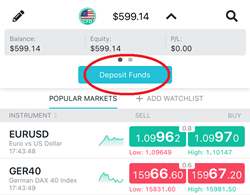
After selecting Deposit Funds, you will see the funding methods available for your region. Choose your preferred payment method and follow the on-screen instructions to complete the deposit.
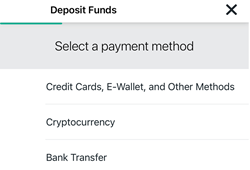
If you prefer to deposit funds through a web browser, you can also fund your account using ThinkTrader Web.
How can I deposit funds into my ThinkMarkets trading account using ThinkTrader Web?
To deposit funds through ThinkTrader Web, log in to your live trading account here.
Once logged in, navigate to the left-hand menu and select Funds. Then choose the trading account you would like to fund.
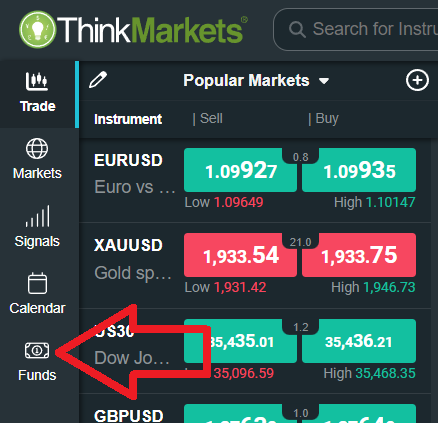
You will then be shown the funding methods available for your region. Select your preferred payment method and follow the instructions to complete the deposit.
How can I deposit funds into my ThinkMarkets trading account using ThinkPortal?
To deposit funds through ThinkPortal, log in and navigate to the left-hand menu and select Funding, then choose Deposit. Select the trading account you would like to fund.
You will then be shown the deposit methods available for your region. Choose your preferred funding option and follow the on-screen instructions to complete the deposit.
Withdrawing funds and processing
How can I withdraw funds from my ThinkMarkets trading account?
To withdraw funds from your ThinkMarkets trading account, log in to ThinkPortal and select the Withdrawal tab from the menu on the left side. Choose the trading account you want to withdraw from and select your preferred withdrawal method.
Please note that ThinkMarkets follows a back-to-the-source policy. This means that withdrawals must generally be processed back to the same payment method that was originally used to make the deposit.
For more detailed information about the withdrawal process, you can visit the Withdrawal of Funds page.
What is the minimum withdrawal amount for a ThinkMarkets trading account?
The minimum withdrawal amount with ThinkMarkets depends on the withdrawal method used.
For bank wire withdrawals, the minimum withdrawal amount is 100 USD.
For cryptocurrency withdrawals, the minimum withdrawal amount is 50 USD.
For most other withdrawal methods, the minimum withdrawal amount is typically 1 USD.
Withdrawal options and limits may vary depending on your region. For more detailed information, please refer to the Withdrawal of Funds page or contact the ThinkMarkets client support team for assistance.
What cryptocurrency withdrawal options does ThinkMarkets offer and how can I withdraw via ThinkPortal?
ThinkMarkets offers United States Dollar Tether withdrawals via the TRC20 and ERC20 networks.
To withdraw cryptocurrency funds, log in to ThinkPortal, navigate to the Withdrawal section, select your trading account, and choose the available cryptocurrency withdrawal option. Follow the on-screen instructions to complete your request.
For more information visit the Funds Withdrawal page.
How can I cancel a withdrawal request in ThinkPortal on my ThinkMarkets trading account?
To cancel a withdrawal request, log in to your ThinkPortal account and follow these steps:
Navigate to Funding >> Transaction History >> select the withdrawal request >> click Cancel.
A withdrawal request can only be cancelled if it is still in Pending status and has not yet been processed. Once the withdrawal has been processed, it cannot be cancelled or reversed.
Can I withdraw funds from my ThinkMarkets trading account if I still have open trading positions?
Yes, you can withdraw funds even if you have open trading positions, as long as your account has enough free equity available. You must ensure that sufficient funds remain in your account to maintain your existing positions after the withdrawal is processed.
How can I withdraw trading profits from my ThinkMarkets trading account using ThinkPortal?
You can withdraw your trading profits through ThinkPortal using several available methods, including bank wire, USDT cryptocurrency, Skrill, and Neteller. Simply submit your withdrawal request through ThinkPortal and select your preferred withdrawal method.
Note: The services mentioned may not be available in your jurisdiction. Please contact the ThinkMarkets client support team for clarification or more information.
Withdrawal issues and restrictions
Why might my ThinkMarkets withdrawal request be declined?
A withdrawal request may be declined for several common reasons.
One reason may be that the withdrawal is being requested to a third-party account or to a payment method that was not previously used to deposit funds. ThinkMarkets follows a back-to-the-source policy, which means withdrawals generally need to be sent back to the original deposit method.
Another reason may be that there are insufficient available funds in your trading account to process the withdrawal request.
If your withdrawal request is declined, the ThinkMarkets team will notify you of the reason and provide guidance on how to proceed. You can also contact the client support team 24/7 if you require further assistance.
Can I deposit with cryptocurrency and withdraw funds in fiat currency from my ThinkMarkets trading account?
No, ThinkMarkets follows a back-to-the-source withdrawal policy. This means that withdrawals must generally be processed back to the same payment method that was used to make the original deposit.
If you deposit funds using cryptocurrency, withdrawals will typically need to be processed using cryptocurrency as well.
Please note that certain funding and withdrawal services may not be available in all jurisdictions. For more information contact the ThinkMarkets client support team.
Can I deposit funds using fiat currency and withdraw them using cryptocurrency from my ThinkMarkets trading account?
No, ThinkMarkets follows a back-to-the-source withdrawal policy. This means that withdrawals must generally be processed back to the same payment method that was used for the original deposit.
If you deposit funds using a fiat payment method such as a bank transfer, card, or e-wallet, the withdrawal will typically need to be made using the same method rather than cryptocurrency.
Can I withdraw funds from my ThinkMarkets trading account using a different payment method than the one used for my deposit?
In most cases, withdrawals must be processed using the same payment method that was used for the original deposit. ThinkMarkets follows a back-to-the-source policy to comply with regulatory and anti-money laundering requirements.
If multiple deposit methods were used, withdrawals may be returned to those funding sources in the same order or proportion as the deposits. Once the deposited amount has been returned to the original payment methods, any remaining profits may be withdrawn using an alternative available withdrawal method, depending on your region and account eligibility.
If you are unsure which withdrawal methods are available for your account, you can check within ThinkPortal or contact the ThinkMarkets client support team for assistance.
What if my original deposit method is unavailable for withdrawal?
If the payment method you used for your deposit is not available when submitting a withdrawal request, you can send a manual withdrawal request from your ThinkMarkets registered email address to ThinkMarkets support team. In your email, include the withdrawal amount, currency, trading account details, and the preferred withdrawal method so the client support team can process your request.
Why was my crypto withdrawal denied after changing my wallet address?
If you recently changed your cryptocurrency wallet address, your withdrawal request may be denied for security reasons. To proceed, you will need to provide valid proof of the wallet address change. Once the ThinkMarkets team verifies the update, you will be able to withdraw funds using the new wallet address.
Note: The service mentioned may not be available in your jurisdiction. Please contact the ThinkMarkets client support team for clarification or more information.
How do I withdraw funds if my linked bank account is closed?
If your bank account is closed and can no longer accept funds, you will need to provide valid proof that the account has been closed along with an updated bank statement for your new bank account. Once the ThinkMarkets team verifies the documents, you will be able to withdraw funds via bank wire to your new bank account.
You can send the proof of closure and the updated bank statement from your registered email address to ThinkMarkets support team.
Why doesn't the card number for my Apple/Google Pay withdrawal match my physical card?
When you add a debit or credit card to Apple Pay or Google Pay, the system does not store or transmit your actual card number. Instead, it generates a Device Account Number (DAN), also known as a Virtual Account Number in Google Pay.
This number is unique to your device and is used for security purposes, which is why the card number displayed in the withdrawal section may not match the number printed on your physical card.
To locate the Device Account Number used by your digital wallet, follow the steps below.
• Apple Pay (iPhone and Apple Watch)
1. Open the Wallet app.
2. Select the card.
3. Tap the three dots in the top right corner.
4. Scroll down to view the Device Account Number.
• Google Pay (Android)
1. Open the Google Wallet app.
2. Select the card.
3. Tap Details or Virtual Account Number depending on your app version.
4. The last four digits of the virtual card number will be displayed.
Can I withdraw to a replacement card if my original was lost or stolen?
No, deposits made using a lost or stolen card cannot be refunded to a replacement card, even if the new card is linked to the same bank account. In this situation, you will need to provide valid proof that the original card was lost or stolen. Once the documentation is verified, ThinkMarkets will process your withdrawal via bank wire instead.
How do I withdraw if my original deposit card is now inactive?
If the card you used to deposit funds is no longer active, you will need to provide valid proof that the card is no longer active. Once the ThinkMarkets team verifies the documentation, you will be able to withdraw your funds via bank wire.
What is the 'Return to Source' policy and why is it required?
To comply with ThinkMarkets Anti-Money Laundering guidelines, deposits and withdrawals made by any third party are strictly prohibited.
ThinkMarkets follows a back-to-the-source policy, which means withdrawals must be returned to the same payment method that was used to make the original deposit. For example, if you deposited funds using Skrill, the withdrawal must also be processed through Skrill. This policy applies to all payment methods offered by ThinkMarkets.
If it is not possible to return the funds to the original payment method, the withdrawal may be processed via bank wire to a bank account that is in the same name as the ThinkMarkets trading account holder.
For more information about withdrawals, please visit the Withdrawal of Funds page.
Transfers between accounts
Can I transfer funds from another broker to my ThinkMarkets trading account?
Yes, ThinkMarkets supports broker-to-broker transfers.
To initiate a transfer, please contact the support team by email and request a Broker to Broker transfer form. Once you receive the form, complete it and send it to the broker you wish to transfer the funds from so they can process the transfer to your ThinkMarkets trading account.
Can I do a broker-to-broker fund transfer to ThinkMarkets?
Yes, ThinkMarkets clients can request a broker-to-broker transfer, which allows you to move funds directly from another regulated broker to your ThinkMarkets trading account. This method can be an efficient way to transfer your funds without withdrawing them to a personal bank account first.
To request a broker-to-broker transfer form, please contact the ThinkMarkets client support team, available 24/7.
How do I transfer funds between my ThinkMarkets accounts?
To transfer funds between two of your ThinkMarkets trading accounts, log in to ThinkPortal, click the Funding tab on the left side, and select Transfer.
Next, choose the From account and the To account, then enter the amount you want to transfer in your preferred currency. Once you submit the request, the inter-account transfer will be processed instantly.
How can I top up the balance of my ThinkMarkets demo trading account?
To top up your ThinkMarkets demo account balance, you can submit a request through ThinkPortal or send an email from your registered email address to ThinkMarkets support. Please include your demo account number and the balance adjustment request.
Once the request is processed, the ThinkMarkets team will send you a confirmation email.
Alternatively, you can contact a live agent through live chat for assistance.
Currency and fees
What is the ThinkMarkets currency conversion fee when depositing or withdrawing in a different account currency?
ThinkMarkets applies a currency conversion fee of 3% when funds are converted from one currency to another during deposits, withdrawals, or transfers involving different account currencies.